


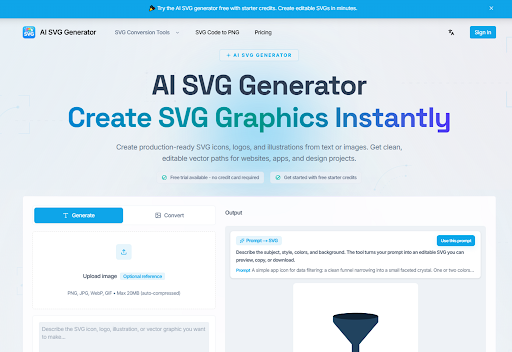
There is a quiet crisis in digital product development. Design tools have gotten more powerful, but the asset creation pipeline remains stubbornly inefficient. A designer sketches an idea, opens a vector tool, draws, adjusts, and exports. A developer takes the export, cleans up the code, and integrates it into the product. Every step introduces friction. Every handoff introduces risk. The promise of AI has always been to compress this pipeline, but most AI image generators produce flat pixels that are useless for real work. Then I found a tool that does something different. It generates editable SVGs from text prompts, and it forced me to reconsider what an AI design tool can actually deliver.
The Core Distinction: Vectors vs. Pixels
The fundamental problem with most AI image generators is that they produce raster images. A PNG or JPG is a grid of pixels. You can scale it up, but it will blur. You can change the color of one element, but only by painting over it. You cannot inspect the code and tweak a stroke weight. You cannot extract a single shape and reuse it elsewhere. You are locked into a flat, uneditable image.
The SVG Generator solves this by producing actual vector paths instead of flattened pixels. The output is not an image. It is a set of mathematical instructions that define shapes, strokes, fills, and groups. This means you can scale it infinitely without losing quality. You can change the color of a single element without touching anything else. You can open it in any vector editor and continue refining the shapes. The distinction is not technical trivia. It is the difference between a disposable concept and a reusable asset.
The Test: Can It Generate an Asset That Survives a Production Workflow?
To evaluate whether the tool actually delivers on its promise, I tested it across several real-world scenarios. The goal was not to see if the AI could make something visually appealing. The goal was to see if it could make something that I could actually use in a production environment.
Scenario One: The Logo That Needed to Be a Single Source of Truth
I started with a logo design prompt: “A geometric logo mark of an origami compass shell, using negative space and a navy, copper, and ivory palette. Centered composition, no text.” This is a specific, detailed brief that would normally require a human designer to spend significant time on research, sketching, and refinement.
The tool generated an SVG with clean, individual paths. The navy, copper, and ivory were applied as separate fills. The negative space was rendered as actual transparent areas. When I opened the file in Illustrator, every anchor point was intact. I could select the compass points, adjust the stroke weight, or change the navy to a different brand color without touching anything else.
- What worked: The asset was a true source file. I could hand it to a developer, and they would have the same editable layers I had. The tool preserved paths, groups, and shapes in a way that made the asset immediately usable.
- What didn’t: The composition was slightly off. The mark was centered but a bit small within the frame. I had to adjust the viewBox and reposition the paths. It was a minor fix, but it required me to open the file in a vector editor.
Scenario Two: The UI Icon That Needed to Be Code-Ready
Next, I tested the tool for a technical use case: a “crisp 24px line icon for product dashboards.” This is the kind of asset that needs to be precise, scalable, and lightweight. It is also the kind of asset that often causes friction between designers and developers because the SVG code is messy or unoptimized.
The tool generated a clean line icon with consistent stroke widths. The SVG code was compact and optimized. The platform emphasizes that its output is “SVGO optimized” and “JSX compatible,” and in this case, it was. I was able to copy the inline code directly into a React component with minimal adjustments. The stroke and fill attributes were clean, and the paths were structured in a way that made sense.
- What worked: The code was production-ready. I did not need to manually clean up a messy SVG export. The tool claims that developers can “copy inline markup into React” and “ship lightweight assets faster,” and this test confirmed that capability.
- What didn’t: The icon design itself was generic. It looked like a solid, standard UI icon, but it lacked a distinct brand voice. The tool is great for generating a solid foundation, but it is not a substitute for a designer’s creative intuition when you need something truly unique.
Scenario Three: The Marketing Graphic That Needed to Be Adapted for Multiple Formats
Finally, I tested the tool for a larger marketing asset: a “minimal landing-page illustration for SaaS hero sections.” This is the kind of asset that often gets created once, used in one place, and then forgotten because it is too difficult to adapt for other formats.
The tool produced a flat illustration with editable shapes and groups. The composition was balanced, and the color palette was harmonious. Because it was an SVG, I could easily change the color of a specific element to match a campaign theme. I could scale it to fit a hero section, a social post, or a print ad without losing quality. The platform emphasizes that one SVG file can “power apps, print, and dark-mode assets,” and this test confirmed that capability.
- What worked: The asset became a single source of truth. I did not need to create separate versions for web, social, and print. I had one file that could be adapted for any surface.
- What didn’t: The illustration style was clean but fairly simple. For a more complex scene with multiple interacting elements, the AI’s understanding of composition and spatial relationships might not be as strong. The result may vary depending on the complexity of the prompt.
The Workflow: A Repeatable Process for Generating Usable Assets
The tool’s process is designed to be simple and repeatable. It is not a black box. It is a structured workflow that guides you from idea to usable asset.
Step One: Describe Your Graphic
You write what you need in natural language: icons, illustrations, logos, UI elements, or diagrams. The quality of the output is directly tied to the quality of the input. A vague prompt will produce a vague result. A specific prompt will produce a much more useful asset.
- The practical takeaway: Treat the prompt like a brief you would give to a human designer. Include details about the intended use, the style, and the technical requirements. The more context you provide, the better the AI can interpret your needs.
Step Two: Generate SVG
Your prompt converts into clean, structured SVG code with editable paths instead of a flat bitmap. This is the core differentiator. The output is not a pixel-based image. It is a set of mathematical paths that can be edited, scaled, and manipulated.
- The practical takeaway: You are not locked into a single, unchangeable image. You get a source file that you can treat as a starting point for further refinement.
Step Three: Customize and Refine
You can fine-tune the generated SVG’s style, color, and details, or regenerate variations for another direction. This is where the tool becomes a creative partner rather than a one-shot generator. If the first result is close but not perfect, you can tweak it. If you want to explore different directions, you can generate variations.
- The practical takeaway: The variation feature is particularly useful for exploration. In my testing, I found that generating a few variations of a logo mark allowed me to quickly compare different compositions and color treatments without redrawing anything.
Step Four: Export and Use
You can download the SVG file or copy optimized code for your website, app, design tool, or client deliverable. The platform supports a wide range of workflows, including Figma, React, Illustrator, Sketch, and Tailwind CSS. This is where the tool proves its worth as a production-ready asset generator.
- The practical takeaway: The output is not a dead-end. It is a living document that can be used across multiple platforms. For designers, the ability to copy-paste directly into Figma layers preserves anchor points, stroke weights, and groups. For developers, the ability to copy inline React components and Tailwind-ready markup is a massive time-saver.
The Honest Limitations: What the Tool Cannot Do
No tool is perfect, and the SVG Generator is no exception. The biggest limitation is the dependency on prompt quality. A vague prompt will produce a vague result. This is not a flaw in the tool; it is a reflection of how AI works. The AI can only interpret what you give it. If you are unclear, the output will be unclear.
Another limitation is the complexity of the output. The tool is excellent at generating clean, structured vectors for standard use cases like icons, logos, and flat illustrations. However, highly complex scenes with multiple interacting elements or very specific, niche subjects may result in a messy or unusable SVG. In my testing, the tool performed best when the prompt was specific and the desired output was relatively simple. For complex scenes, you might need to generate a few times to get a usable result, or use the generated output as a base layer to build upon in your own design tool.
The platform notes that most generations use 1–4 credits, and downloads and exports do not use extra credits. The pricing structure is designed to accommodate different usage patterns: free starter credits for testing, one-time credit packs for occasional use, and monthly plans for ongoing work. The Standard plan offers 100 credits per month at $19.9 per month, and the Pro plan offers 350 credits per month at $39.9 per month.
Comparing the Experience: AI Vector Generation vs. Traditional Methods
To put the experience into perspective, it is helpful to compare this AI-driven workflow against the traditional methods most creatives are used to.
| Factor | Traditional Vector Creation | AI SVG Generator Workflow |
| Learning Curve | Steep; requires mastery of complex software. | Gentle; accessible to non-designers. |
| Speed | Slow, iterative process. Can take hours or days. | Rapid generation of drafts. First drafts in seconds. |
| Control | Complete control over every anchor point and path. | High-level control through prompting; fine-grained control via editing the generated SVG code. |
| Best For | Final, polished, and highly bespoke designs. | Rapid ideation, generating starting points, and creating assets for standard use cases. |
| Outcome | Consistent and predictable but labor-intensive. | Depends on prompt quality; may require multiple generations. |
Who This Tool Is Actually For
Based on my testing and the real-world testimonials on the site, the SVG Generator is an ideal solution for several distinct groups.
- For the Solo Founder: As Owen Mitchell notes, the ability to create consistent assets for app icons, onboarding illustrations, and a launch page without hiring separate freelancers is a game-changer. It empowers non-designers to create professional-looking assets.
- For the Frontend Developer: Developers can use the tool to generate custom icons and illustrations for their projects without having to wait for a design team or struggle with a design tool themselves.
- For the Product Designer: For designers, the tool serves as a powerful ideation partner. It can generate 4-5 different directions for an icon or illustration before opening Figma, allowing for faster exploration and more confident decision-making.
- For the Etsy Shop Owner: Speed is critical for creators who need to react to market trends. The tool allows them to quickly test sticker and cut-file ideas before a trend passes.
The Bottom Line
The SVG Generator is a pragmatic tool for a specific problem. It is not a magic wand that creates perfect, finished artwork with a single click. It is a tool that generates a structured, editable foundation that you can then refine and perfect. It democratizes access to vector graphics, speeds up the ideation process, and bridges the gap between design and development. If you have ever spent hours redrawing an asset because the original SVG was a mess, or if you have ever wished you could generate a production-ready vector from a text prompt, svg generator is worth your time. It delivers on its core promise: turning ideas into editable vectors, and letting you take it from there.
