


Magazine cards punish the wrong crop before anyone notices the animation. A feature photo has to carry a place, a date, or a face in a slot that is already smaller than the original file. If that slot is ignored, motion only makes the missing fact harder to see. For a section desk, an ai image to video generator helps only after the still has been sized to the card the reader will actually open.
The usual rush is to animate first and fit later. That order creates rework. The clip looks complete on a wide preview, then the web card cuts the street sign, the standfirst date, or the person the story is about. Image to Video AI can turn an approved still into a 4s or 6s cue. It cannot decide which edge of the photograph the page needs. That decision belongs to the desk before anyone writes a prompt.
The Page Slot Decides Whether Motion Helps
A regional magazine page is a set of competing objects. The photo sits beside a headline, a standfirst, and often a location line. The reader looks at the card on a phone, then at the article header, then maybe at a social preview that crops again. Motion has to survive all three views without inventing a new subject.
Print and web do not share the same edges. A horizontal print spread can hold a street and a doorway. The web card may keep only the doorway. If the motion was planned for the print crop, the web version can swing toward blank brick and leave the named place offscreen. The editor then has a file that looks finished and a page that no longer explains itself.
This is why a pretty pan can still fail. If the camera drifts toward empty sky, the card loses the shopfront the story names. If the move pushes a caption area into glare, the date becomes unreadable. The desk wants one cue that keeps the same fact in view, not a cinematic tour.
On our desk, the first version of a moving header is judged in the card, not in the generator. Keep the same still each time the clip comes back for review. If the live slot cannot show the place or the person, the file does not move forward.
Lock Crop And Caption Before The Prompt
Write two things down before upload: the crop the card will use, and the one fact that must remain visible through the whole clip. Those two notes prevent the prompt from becoming a second story. They also give another editor a way to reject the file without arguing about taste.
The fact should be something a reader can point to. A street name on a wall. A festival date on a banner. A speaker’s face in the same crop used in the print edition. If the fact lives only in the caption and the photo cannot support it, motion will not repair that gap.
Do this on paper or in the story ticket, not in the prompt box. Once the generator is open, people start adding weather, crowd movement, and extra camera turns because the interface invites them. The ticket keeps the job small: one crop, one fact, one move. If a second fact matters, it belongs in the standfirst, not in a second animation request.
Crop The Approved Still To The Card
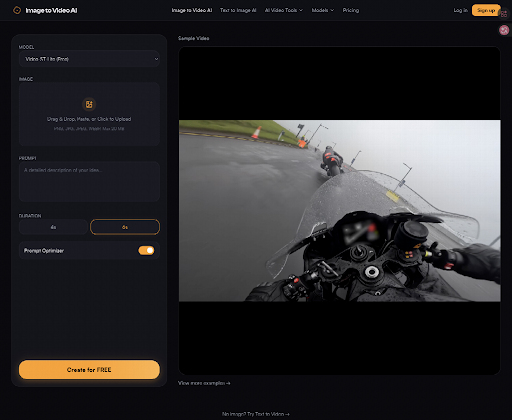
Start from the photograph the page has already approved, not from a chat screenshot or a temporary social cut. Then crop it to the card ratio before anyone asks for movement. Image to Video AI lets the editor frame the image to the desired aspect ratio before generation starts. Use that control as a page tool, not as a creative extra.
A landscape file dropped into a square card will lose the edges that often hold signs and dates. A tall portrait forced into a wide header can cut the face the standfirst names. Do the crop in the slot first. Then generate. If you generate first and crop later, the motion was planned for a picture the reader will never see.
Keep One Caption Fact Readable Throughout
Pick one line the clip must not hide. For a local feature, that is often a place name. For a preview piece, it may be a date or a venue. Write that line next to the still so the review does not rely on memory.
Then watch the clip at card size. If the sign melts into the wall, or the date becomes unreadable against the caption line, the motion is doing the wrong job. A glow that looks atmospheric on a large player can wipe the only fact the page needed. That clip would never clear editorial review, because the story and the picture would no longer agree.
Walk The Official Generate Steps Once
The official path is short enough to run as a desk habit. Upload a PNG, JPG, JPEG, or WEBP still up to 20 MB. Frame the crop. Write one motion line. Choose 4s or 6s. Generate. Preview. Download only after the card check. That is the whole loop. Extra steps usually mean the brief is still vague.
Treat the first generate as a proof of the crop, not as a finished header. If the framed still already hides the venue or the speaker, stop and recrop. Generating again from a bad frame only spends time on a picture the page cannot use. The tool will follow the edges you gave it. It will not recover a sign that you already cut away.
On an ai image to video generator, the prompt should describe a movement a visitor could point to: a slight drift along a shopfront, a small push toward a doorway, a hold on a banner. “Make the town look alive” gives the tool too much room and the editor too little to defend.
Upload Frame Then Describe One Movement
Upload the approved still first. Use the frame control so the generator sees the same edges the card will show. Then write one change. Leave the rest of the picture still. If the team wants a second idea, run a second pass from the same still rather than stacking requests into one sentence.
Choose 4s when the cue is a small hold or drift. Choose 6s only when the extra time is needed to reach the one fact, not to add a second move. Image to Video AI is built around those two durations. A magazine card rarely needs more than one of them. A longer wish list belongs in a different production, not in this header.
After generate, do not approve from the tool’s large preview. Place the file in the article card, the homepage tile, and the social cut the desk actually uses. Watch it without the prompt beside it. The reader will not have the prompt. The reader will only have the picture and the standfirst.
Check The Clip On The Live Card
The review has three passes, and they are all visual. First, name the subject from the card alone. Second, see whether the movement hides the caption fact. Third, read the standfirst at phone size while the clip plays. If any pass fails, the file goes back. It is not a taste debate.
Do the phone pass last, and do it away from the generate screen. A date that survives a laptop player can vanish once the card sits under a headline and a share bar. If a colleague who did not write the prompt cannot name the place after one loop, the header is still doing private work. The page needs a public picture.
Marketing copy on the site talks about HD output up to 1080p. That number is useful only after the crop is right. A sharp file that cuts the venue name is still a failed header. Compare the moving file with the approved photograph. If the moving version invents a new object, a new face, or a new sign, stop. The page asked for a cue, not a rewrite of the photograph.
Leave a short note on the story ticket: source still, crop, duration, one motion line, and the reason it passed. The next editor should be able to repeat the same path without guessing. In our desk week, that note has saved more time than another round of adjectives.
Desk Mistakes That Waste A Rewrite Hour
Most wasted hours come from skipping the slot. The generator did what it was asked. The page then asked for a different picture. These are the mistakes that send a file back to the photo editor.
- Generating from a wide still, then forcing the clip into a square card.
- Writing a prompt that adds light, weather, and a camera turn at once.
- Approving on a desktop player and never opening the phone card.
- Letting motion cover the date, street, or face named in the standfirst.
- Starting from a compressed chat image instead of the approved feature file.
Each item creates the same cost. The desk wasted an hour, then sent the still back for a recrop that should have happened first. The discarded clip may look lively. It still failed the page.
Short Clips Still Fail Some Feature Pages
A 4s or 6s cue cannot carry a walking tour, a speaker’s argument, or a sequence that needs sound. Soft or tightly compressed stills also stay soft in motion. If the story depends on a long look or a voice, keep the still and write the caption. The generator is a header tool, not a substitute for the piece.
Move The Photo Without Changing The Story
Image to Video AI fits a magazine desk when the still is already approved, the card crop is locked, and the prompt asks for one visible cue. Use the frame control before generate. Judge the file in the live slot. Keep the place, date, or face the standfirst already named.
The useful finish is quiet. The photo can move a little. The story should not. If the clip hides the fact the page was built to show, leave the still in place and spend the hour on the copy instead.
