



AI video tools are no longer judged only by whether they can produce a clip. The better question is whether they fit the way creators, marketers and product teams actually work: planning, referencing, reviewing, revising and then deciding what is ready to publish.
That is why the comparison between Seedance 2.5 and MiniMax H3 is useful. Both sit inside the same fast-moving AI video category, but they appear to serve slightly different creative habits. One is easier to discuss through reference-heavy drafting and longer reviewable clips. The other is often discussed through multimodal generation, motion design and native audio.
This is a feature-based workflow comparison, not a controlled benchmark using identical prompts. Real output quality can vary by prompt, reference quality, account settings and the type of scene being generated. Still, the feature direction tells creators a lot about where each tool may fit.
Why This Comparison Matters
For many teams, the bottleneck is not the idea itself. It is turning that idea into something specific enough to review.
A campaign team may need to show a product in motion before booking a shoot. A creator may want to test whether a scene has enough rhythm for a short story. A publisher may want a visual draft before asking an editor, designer or client to spend time on the final asset.
In that setting, an AI video model is not just a generator. It becomes part of the planning process. The difference between models is less about which one sounds more advanced and more about which one reduces uncertainty for the task in front of you.
Where Seedance 2.5 Stands Out
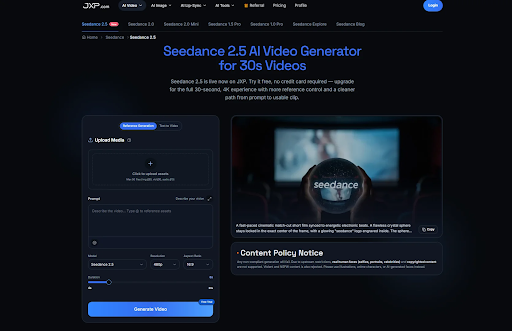
Seedance 2.5 is built around a practical idea: some video concepts need more time, more references and more room for revision than a quick visual test can provide.
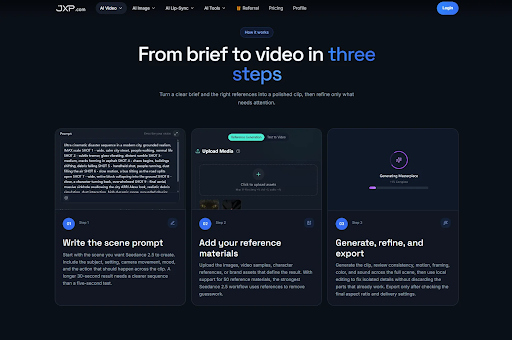
The strongest Seedance 2.5 use case is a draft that depends on several pieces of direction at once. A product video may need the item, packaging, lighting style, camera rhythm and brand mood to stay connected. A creator short may need a character, environment, tone and movement pattern to remain consistent across a longer scene.
That is where reference control becomes important. Seedance 2.5 is presented around richer multimodal reference input, with support for up to 50 references in suitable workflows. Instead of relying on one prompt to describe everything, teams can bring approved images, clips and audio cues into the brief.
It is also positioned around longer single-segment output, 4K support in compatible workflows and local refinement after generation. Those details matter when the goal is not simply to make something eye-catching, but to create a clip that can survive review.
Where MiniMax H3 Looks Strong
MiniMax H3 belongs to the same new generation of AI video models, but the conversation around it is different. It is often described in relation to multimodal generation, native stereo audio, dynamic motion and short cinematic scenes that combine image, video, sound and prompt direction.
That gives H3 a clearer advantage in scenes where motion and sound need to be judged together. In current discussions, H3 is commonly framed around clips up to 15 seconds, 2K output and native audio generation, which makes it interesting for creators testing a short action beat, a camera move, a spoken moment or an atmospheric scene.
The trade-off is that this type of workflow may still need careful prompt design. Motion-heavy outputs can look impressive quickly, but teams still need to check whether the action supports the message, whether sound is licensed and appropriate, and whether the generated scene says what the brief actually intended.
In other words, MiniMax H3 may be easier to understand as a model for expressive scene generation, while Seedance 2.5 is easier to understand as a model for reference-led video drafting.
The Real Difference: Reference-Heavy Drafting or Audio-Led Motion?
The most useful way to compare the two is not to ask which model is “better.” It is to ask what kind of uncertainty each one helps reduce.
If a team already has product assets, style references, visual examples and a clear brief, Seedance 2.5 may be the more natural fit. Its value is in helping those materials work together in a longer, reviewable draft. The team can judge pacing, visual continuity and whether the references are strong enough before moving toward final production.
If the idea depends more on sound, energetic movement or a short cinematic moment, MiniMax H3 may be worth exploring. Its appeal is the possibility of generating a more complete audiovisual impression earlier in the process.
Both approaches are useful. They simply answer different questions.
A Quick Workflow Comparison
| Workflow question | Seedance 2.5 | MiniMax H3 |
| Best fit | Reference-heavy drafts that need review and revision | Short audiovisual scenes where motion and sound matter early |
| Useful strength | Longer single-segment drafting, richer reference input and local refinement | Native audio, dynamic motion and compact cinematic scene testing |
| Typical review focus | Reference consistency, pacing, brand fit and handoff clarity | Action timing, camera movement, audio feel and scene energy |
| Main caution | Do not treat generated drafts as final proof of product or factual claims | Check audio rights, voice use, action accuracy and generated details |
For Product and Brand Teams
Product and brand teams usually need control before spectacle. A clip that looks impressive but changes the product shape, color, label or usage context can create more work, not less.
That is why Seedance 2.5 may fit teams that already have approved product images, packaging references, campaign notes and brand guidelines. A reference-led draft can help the team see whether the video idea is worth developing without pretending the output is already a final advertisement.
MiniMax H3 may still be useful for product storytelling, especially when the goal is a short mood piece, launch teaser or social concept with sound. But any generated product detail should be checked against real assets before publication.
For Creators and Publishers
Creators often work differently from brand teams. They may care less about strict product accuracy and more about rhythm, feeling and whether the video holds attention.
For that kind of work, H3’s audio and motion direction may be appealing. A creator testing a short cinematic beat may want to know how sound and motion feel together as early as possible.
Seedance 2.5, however, may be stronger when the creator wants to build a more structured visual draft. A travel concept, explainer, portfolio story or product-led short can benefit from a longer scene and a larger set of references. The result does not have to be final to be useful. It only has to make the next creative decision clearer.
What to Check Before Choosing
Before choosing between Seedance 2.5 and MiniMax H3, teams should look beyond headline features and ask practical questions:
- Does the project need a longer single draft or a shorter expressive scene?
- Are approved visual references more important than native audio?
- Will the result be reviewed by a team, a client or only the creator?
- Does the clip need product, brand or character consistency?
- Can the team verify text, faces, copyrighted material, sound and factual claims before publishing?
- Is the output meant to guide production, or is it expected to become the final asset?
The answers usually matter more than the model name.
Safety, Rights and Accuracy Still Matter
Neither model removes the normal responsibilities of publishing. Teams should avoid unsupported real human faces, celebrity likenesses, copyrighted characters, private data and unlicensed audio or video references. Generated media should not be presented as evidence of a real event, real person, verified product performance or factual demonstration unless it has been properly checked.
Audio deserves special care. Access to a song, voice sample or previous campaign clip does not automatically grant permission for AI processing, synchronization or derivative use. If sound is part of the output, rights should be confirmed before the clip is used publicly.
How to Choose
The Seedance 2.5 video generator makes the most sense if the brief depends on reference-heavy, reviewable video drafts with more structure. MiniMax H3 makes sense if the goal is to explore compact multimodal scenes where motion and audio need to be considered together.
That does not make one model the universal winner. It means creators should choose based on workflow. If the problem is keeping references, pacing and revision under control, Seedance 2.5 is the more obvious place to start. If the problem is testing a short audiovisual moment with native sound, MiniMax H3 may be the better first test.
The larger trend is clear: AI video is moving from simple prompt experiments toward specialized creative workflows. The best tool is the one that helps a team make a better decision before spending time on the final production.
