


Think about this for a moment. You open an app, and suddenly you see numbers, charts, alerts, and updates everywhere. It feels confusing, right? You are not sure what matters and what you should focus on. This is a common problem in 2026 because apps collect a lot of data every second.
Now imagine a clean screen that shows only the most important things. You can quickly see what is going on, what needs attention, and what is working well. That is exactly what a core app dashboard does. It turns messy data into something simple and useful.
In this article, we will talk about everything you need to know about a core app dashboard. You will learn what it is, how it works, its main parts, features, and why it is so important today. By the end, you will clearly understand how it helps people make faster and smarter decisions.
What Is a Core App Dashboard?
A core app dashboard is like the main control center of an app. It is the first screen you see after logging in. It shows the most important information in one place so you do not have to search for it.
For example, if you are using a business app, the dashboard may show sales numbers, user activity, and alerts. If you are using a smart home app, it may show your devices, energy use, and notifications. Everything important is right in front of you.
The main goal of a core app dashboard is to make life easier. Instead of reading long reports or checking different sections, you get a simple and clear view. This helps you understand what is happening and take action quickly without confusion.
How a Core App Dashboard Works in Real Life
Let’s keep it simple. First, a user logs into the app. After logging in, the core app dashboard opens. This dashboard shows live data, which means the information keeps updating automatically.
Now, the user can look at charts, numbers, and alerts. If something looks wrong, like a drop in sales or a system issue, the user can quickly take action. This saves time and avoids bigger problems later.
For example, imagine you run an online store. Your dashboard shows a sudden drop in orders. You notice it quickly and check what went wrong. Maybe there is a payment issue or a website error. Without the dashboard, you might not notice it until much later.
Core App Dashboard Visuals: How Data Becomes Easy
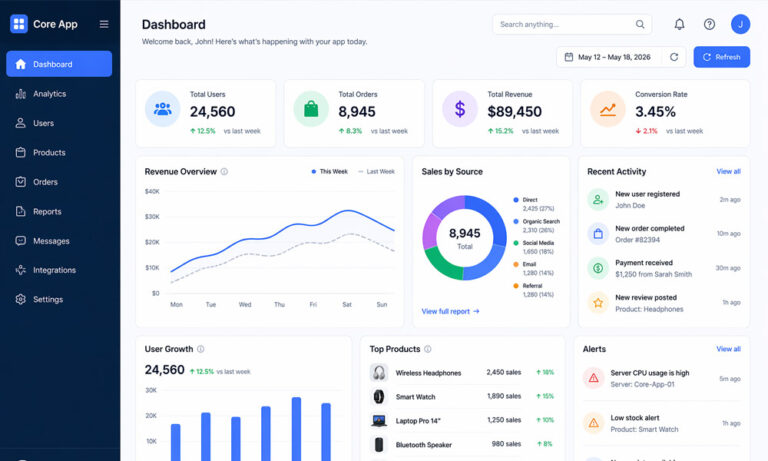
One of the best parts of a core app dashboard is its visuals. Instead of showing boring numbers, it uses charts, graphs, and simple boxes to explain things.
For example, a line chart can show how your sales are growing over time. A bar chart can compare different products. A small box can show total users in one glance. These visuals make it easy to understand information quickly.
Think about it like this. Would you rather read a long list of numbers or look at a simple chart? Most people prefer visuals because they are faster and easier to understand. That is why visuals are so important in every core app dashboard.
Main Parts of a Core App Dashboard You Should Know
A good core app dashboard is made of several important parts. Each part has a clear purpose and helps the user understand data better.
First, there are KPI cards. These show important numbers like total users, revenue, or performance. They are usually placed at the top so users can see them quickly. Then come charts and graphs, which show trends and comparisons in a simple way.
There are also tables for detailed data. These are useful when users want to see exact numbers. Filters and controls help users change what they see, like selecting a time range or location. Alerts and notifications warn users when something needs attention. Finally, the navigation menu helps users move easily inside the app.
Key Features of a Modern Core App Dashboard in 2026
In 2026, a core app dashboard is smarter and more powerful than ever. One of the most important features is real-time updates. This means data changes instantly, so users always see the latest information.
Another key feature is customization. Users can change their dashboard based on what they need. For example, they can move widgets, choose what data to show, or set their own filters. This makes the dashboard more personal and useful.
Modern dashboards also work on all devices. Whether you use a phone, tablet, or computer, the experience stays smooth. Many dashboards now include AI insights as well. These can show trends, give suggestions, and even warn about possible problems before they happen.
Top Benefits of Using a Core App Dashboard
Using a core app dashboard has many benefits. One of the biggest is faster decision-making. When you see clear data, you can decide quickly without wasting time.
Another benefit is saving time. Instead of checking different parts of an app, everything is in one place. This makes work easier and more efficient. It also helps users stay focused on what really matters.
A dashboard also improves monitoring. You can keep an eye on performance, track changes, and spot problems early. This is very helpful in business, IT systems, and even daily tasks. Overall, a core app dashboard makes your work smarter and simpler.
Types of Core App Dashboard Visuals (And When to Use Them)
Different visuals in a core app dashboard have different uses. Choosing the right one is very important. For example, KPI tiles are best for showing one important number quickly. They are simple and easy to understand.
Line charts are perfect for showing changes over time. If you want to see growth or decline, this is the best choice. Bar charts are useful when you want to compare different items, like products or regions.
Tables are helpful when you need exact details. Heatmaps can show patterns, but they need a bit more attention to understand. The key idea is simple: use the right visual for the right purpose so users can understand data without effort.
How Users Access a Core App Dashboard Safely
Accessing a core app dashboard starts with logging in. Users usually enter their email and password. Some apps also use extra security like two-step verification to keep data safe.
After logging in, users may see different dashboards based on their role. For example, a manager may see high-level data, while an analyst may see detailed reports. This is called role-based access, and it keeps information secure and organized.
Users can also personalize their dashboards. They can save filters, choose what they want to see first, and set their own preferences. The dashboard also updates regularly, so users always have the latest data in front of them.
Real-Life Uses of Core App Dashboard in Different Fields
By now, you understand how a core app dashboard works. But where do people actually use it in real life? The answer is simple—almost everywhere. In 2026, dashboards are part of daily work in many industries.
In business, companies use dashboards to track sales, revenue, and customer behavior. A manager can open the dashboard and quickly see if sales are going up or down. This helps them make fast decisions, like changing a strategy or fixing a problem.
In IT and tech, dashboards are used to monitor systems. For example, engineers can see server health, app performance, and security alerts. If something goes wrong, they can act quickly. Even smart homes use a core app dashboard to control lights, devices, and energy usage. It makes life easier and more organized.
7 Simple Rules to Make a Clear Core App Dashboard
Creating a clear core app dashboard is very important. If the dashboard is confusing, people will not use it. That is why these simple rules help keep things clean and useful.
First, always design for questions, not just data. Ask yourself, “What does the user want to know?” Then show that answer clearly. Also, show only one main idea in each chart. Too much information in one place can confuse users.
Next, keep everything simple. Avoid adding too many features or controls. Use colors carefully. For example, red can mean a problem, and green can mean success. Always show time trends, like growth over days or months. Finally, show a simple overview first, then let users explore more details if they want.
Best Practices for Core App Dashboard Design
To build a great core app dashboard, you need to follow some best practices. These make the dashboard easy to use and enjoyable.
Start by grouping related data together. For example, keep all sales data in one section. This helps users understand things faster. Also, highlight the most important information. Make key numbers bigger or place them at the top.
Keep the layout clean. Do not fill the screen with too many items. Use clear labels so users know what they are looking at. Add simple interactive features like filters, but do not overdo it. Let users customize their dashboard so it fits their needs.
Common Core App Dashboard Mistakes to Avoid
Even a good core app dashboard can fail if it has common mistakes. One big mistake is adding too much data. More data does not mean better results. It often makes things confusing.
Another mistake is using too many colors. A colorful dashboard may look nice at first, but it can be hard to understand. Stick to a few meaningful colors. Also, do not ignore mobile users. Many people use dashboards on their phones, so the design must work well on small screens.
Skipping user testing is another problem. What looks clear to you may not be clear to others. Always test your dashboard with real users. This helps you find problems early and fix them.
Tools to Build a Core App Dashboard Easily
You do not need to build everything from zero. In 2026, many tools can help you create a core app dashboard quickly and easily.
Some popular tools include Tableau, Power BI, and Looker. These tools let you create dashboards using simple drag-and-drop features. You can connect your data and start building visuals without much coding.
If you want more control, you can use tools like Chart.js or D3.js. These help you build custom charts. You can also use APIs to connect different data sources. The best tool depends on your needs, but the good news is there are many easy options available today.
Conclusion
Now you have a full understanding of what a core app dashboard is and why it matters. In simple words, it is a smart way to turn data into clear and useful information.
In 2026, data is everywhere. Without a dashboard, it becomes hard to manage and understand. But with a core app dashboard, everything becomes simple, clear, and easy to act on.
If you are running a business, managing systems, or even tracking personal tasks, a dashboard can make a big difference. It saves time, reduces stress, and helps you make better decisions. That is why it is not just a tool anymore—it is a must-have for modern apps.
(FAQs)
What is a core app dashboard and why do people use it?
A core app dashboard is the main screen of an app where you see important data, charts, and updates in one place. People use it to save time and understand information quickly without checking many different pages.
What kind of data can you see on a core app dashboard?
You can see many types of data like user activity, sales numbers, system performance, alerts, and trends. It depends on the app, but the goal is always to show the most useful information clearly.
How does a core app dashboard help in making decisions?
It shows data in simple visuals like charts and graphs. This helps users quickly understand what is happening and take action without wasting time on long reports.
Is a core app dashboard only for businesses?
No, it is not just for businesses. It is also used in smart homes, fitness apps, learning apps, and personal productivity tools. Anyone who wants to track data can use a dashboard.
Can beginners easily use a core app dashboard?
Yes, most dashboards are designed to be simple and easy to use. Even if you are not tech-savvy, you can understand the layout and use basic features without any problem.
What makes a good core app dashboard design?
A good dashboard is clean, simple, and easy to understand. It shows only important data, uses clear visuals, and allows users to find information quickly without confusion.
How often does a core app dashboard update data?
Most modern dashboards update data in real time or near real time. This means users always see the latest information and can react quickly if something changes.
Can I customize my core app dashboard layout?
Yes, many dashboards allow you to move widgets, choose what data to display, and set filters. This helps you create a dashboard that fits your needs and work style.
What are the most common mistakes in a core app dashboard?
Common mistakes include showing too much data, using too many colors, making charts hard to read, and ignoring mobile users. These mistakes can make the dashboard confusing.
Do I need coding skills to build a core app dashboard?
Not always. Many tools like Power BI and Tableau let you build dashboards without coding. But if you want advanced features, some coding knowledge can be helpful.
Continue reading: Your Topics Multiple Stories: The New Way to Explain Big Ideas Easily
