


As IT infrastructure continues to grow in complexity, professionals are looking for smarter ways to monitor multiple systems without sacrificing valuable rack space. Whether you’re managing a data center, network operations center (NOC), broadcast facility, or industrial control room, having access to multiple displays can significantly improve productivity and operational efficiency.
Two of the most popular solutions are dual LCD display drawers and triple LCD display drawers. Both are designed to maximize workspace while providing convenient access to multiple screens within a standard server rack. However, choosing between them depends on your workflow, monitoring requirements, available rack space, and budget.
This guide compares dual and triple LCD display drawers to help you determine which solution is best for your organization.
What Is an LCD Display Drawer?
An LCD display drawer is a rack-mounted console that slides into a standard 19-inch server cabinet. Unlike traditional desktop monitors, these systems are designed to save space while providing quick access to one or more displays.
Most LCD display drawers include:
- High-resolution LCD screens
- Sliding rack mechanism
- Durable metal enclosure
- Compact design
- Optional integrated keyboard and touchpad
- Optional KVM switch support
When not in use, the drawer slides neatly back into the rack, keeping equipment protected and organized.
What Is a Dual LCD Display Drawer?
A dual LCD display drawer features two integrated monitors mounted within a single rack-mounted unit.
This setup allows administrators to:
- View two systems simultaneously
- Monitor multiple dashboards
- Compare data across applications
- Increase productivity without adding external monitors
Dual display solutions are widely used in enterprise IT environments where moderate multitasking is required.
What Is a Triple LCD Display Drawer?
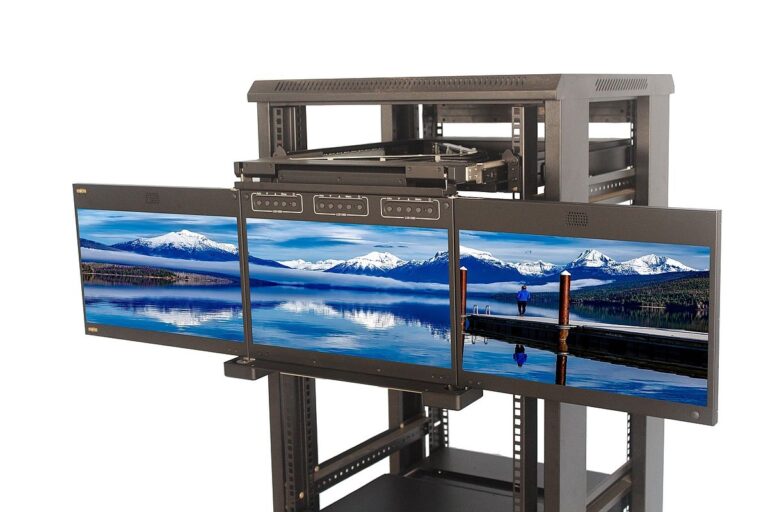
A triple LCD display drawer expands this concept by providing three integrated displays within one rack-mounted console.
The additional screen enables operators to monitor even more information simultaneously, making it particularly valuable in environments that rely on continuous data visibility.
Triple display drawers are commonly deployed in:
- Large data centers
- Security operations centers
- Broadcast control rooms
- Industrial automation facilities
- Telecommunications networks
- Military command centers
Space Efficiency
Both dual and triple display drawers are designed to maximize rack utilization.
Dual LCD Display Drawers
Dual-screen models provide a compact solution while leaving more rack space available for additional equipment.
They are ideal for organizations where rack capacity is limited.
Triple LCD Display Drawers
Triple-screen systems require slightly more installation space but provide substantially more viewing area.
For organizations managing multiple applications simultaneously, the increased display capacity often outweighs the additional rack space required.
Productivity Comparison
One of the biggest differences between these solutions is workflow efficiency.
Benefits of Dual Displays
With two screens, administrators can easily:
- Monitor two servers
- Compare log files
- View documentation alongside management software
- Run diagnostics while observing system performance
For many IT teams, dual displays provide an excellent balance between functionality and simplicity.
Benefits of Triple Displays
Adding a third display significantly expands operational flexibility.
Operators can simultaneously monitor:
- Server dashboards
- Network monitoring software
- Security alerts
- Performance analytics
- Virtual machines
- Remote sessions
This reduces the need to constantly switch between applications, saving valuable time during troubleshooting.
Multi-Tasking Performance
Today’s IT professionals rarely work with a single application.
Typical workflows involve:
- Remote desktop sessions
- Network monitoring
- Ticketing systems
- Documentation
- Virtualization platforms
Triple LCD display drawers provide additional workspace that minimizes application switching and improves productivity during complex administrative tasks.
Ideal Applications
Dual LCD Display Drawers
Best suited for:
- Small data centers
- Corporate IT departments
- Educational institutions
- Healthcare facilities
- Branch office server rooms
- Manufacturing facilities
Triple LCD Display Drawers
Ideal for:
- Enterprise data centers
- Network operations centers
- Cloud service providers
- Security monitoring centers
- Government agencies
- Financial institutions
- Broadcast environments
Organizations handling large amounts of real-time information often benefit from the additional display.
Cost Comparison
Budget is always an important consideration.
Dual LCD display drawers generally offer:
- Lower purchase cost
- Reduced installation expense
- Lower power consumption
- Excellent value for medium-sized deployments
Triple LCD display drawers require a higher initial investment but provide greater operational capability.
For organizations where technician productivity directly affects business operations, the additional cost is often justified.
Power Consumption
Both display types use energy-efficient LED technology.
However, three displays naturally consume more power than two.
The difference is typically modest, but organizations managing hundreds of racks may wish to evaluate total energy requirements when planning large deployments.
Cable Management
One advantage shared by both solutions is improved cable organization.
Integrated display drawers help reduce:
- External monitor cables
- Desk clutter
- Workspace congestion
Dual display systems generally involve slightly fewer connections, while triple display systems may require additional video interfaces depending on system configuration.
Both options create significantly cleaner server environments compared to using multiple standalone monitors.
Display Quality
Modern LCD display drawers offer excellent image quality.
Common features include:
- Full HD resolution
- LED backlighting
- Wide viewing angles
- Anti-glare screens
- Adjustable brightness
Both dual and triple display solutions deliver comparable visual performance.
The primary difference is simply the number of available screens.
KVM Integration
Many enterprise LCD display drawers support integrated KVM switches.
This enables administrators to manage multiple servers from one console.
Benefits include:
- Reduced hardware
- Centralized management
- Faster server access
- Improved efficiency
Both dual and triple display drawers can be configured with enterprise-grade KVM functionality depending on operational requirements.
Reliability
Enterprise LCD display drawers are designed for continuous operation.
Features often include:
- Heavy-duty steel chassis
- Industrial-grade LCD panels
- Durable sliding rails
- Long-life LED backlighting
- Reliable cooling design
Whether choosing dual or triple displays, selecting high-quality hardware ensures dependable long-term performance.
Choosing Between Dual and Triple Displays
When deciding which solution best fits your organization, consider several important questions.
How Many Applications Need Constant Visibility?
If technicians frequently monitor only two systems, a dual display drawer is usually sufficient.
If multiple dashboards, monitoring tools, and management platforms must remain visible simultaneously, a triple display drawer provides greater flexibility.
Available Rack Space
Organizations with limited rack capacity may prefer dual displays due to their smaller footprint.
Facilities prioritizing operational efficiency over rack density may find triple displays more valuable.
Budget
Dual display drawers provide excellent performance at a lower cost.
Triple display drawers require a larger investment but often improve technician productivity enough to justify the expense.
Future Growth
As IT infrastructure expands, monitoring requirements often increase.
Organizations expecting future growth may benefit from investing in triple display systems that provide additional flexibility.
Comparison Table
| Feature | Dual LCD Display Drawer | Triple LCD Display Drawer |
| Number of Displays | Two | Three |
| Rack Space | Compact | Slightly Larger |
| Productivity | High | Very High |
| Multitasking | Excellent | Outstanding |
| Purchase Cost | Lower | Higher |
| Power Usage | Lower | Slightly Higher |
| Monitoring Capacity | Moderate | Extensive |
| Best For | Enterprise IT, Small Data Centers | Large Data Centers, NOCs, SOCs |
Why Businesses Choose Rackmount Sales
Choosing the right display solution requires both quality hardware and expert guidance.
Rackmount Sales offers enterprise-grade dual and triple LCD display drawers designed for demanding environments, including data centers, network operations centers, industrial automation, healthcare, government, and broadcasting.
Our rack-mounted display solutions provide exceptional image quality, reliable construction, space-saving designs, and flexible configuration options to help organizations improve efficiency while maximizing rack utilization.
Whether you need a compact dual-screen solution or a high-performance triple-display console, Rackmount Sales delivers dependable hardware built for long-term professional use.
Final Thoughts
Both dual and triple LCD display drawers offer significant advantages over traditional desktop monitor setups. They improve organization, reduce cable clutter, maximize rack space, and simplify server management in professional IT environments.
A dual LCD display drawer is an excellent choice for organizations with moderate monitoring requirements and limited rack space. It provides a practical balance of performance, efficiency, and cost.
A triple LCD display drawer, on the other hand, is ideal for high-density data centers, network operations centers, and mission-critical facilities where multiple applications must remain visible at all times. The additional display enhances multitasking, improves operational awareness, and supports faster decision-making.
Ultimately, the right choice depends on your organization’s workflow, infrastructure, and future growth plans. By selecting a high-quality solution from Rackmount Sales, businesses can build a more efficient, organized, and scalable IT environment that supports long-term operational success.
