


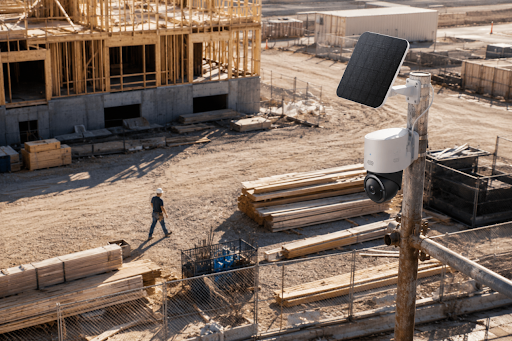
How to Set Up Jobsite Security Cameras Without Permanent Infrastructure
Jobsite security cameras on temporary buildings face a practical gap. Tools and materials disappear after the crew leaves, but most sites still lack wired power, internet, and fixed mounts, so theft and disputes are hard to resolve during unstaffed nights and weekends. This guide covers power, connectivity, placement, alert setup, and a reusable kit for the next project.
Start with three essentials for jobsite security cameras
A construction site security camera has to work while the site is still changing. Materials move, fencing shifts, and the highest risk area may change from a lumber stack to appliances inside a half-finished building. The first decision is not resolution. It is whether the camera can stay powered, stay connected, and save useful footage.
The first filter is power. Solar-powered security cameras fit fence posts, poles, trailers, and storage containers that need coverage for weeks. Rechargeable battery cameras can work on short remodels, while generator-supported setups may help larger jobs but can go dark when the generator is off.
Connectivity is the second filter. A temporary jobsite camera plan cannot assume wired internet is ready. Existing Wi-Fi helps on some remodels, but new builds and remote lots often need cellular cameras, mobile hotspots, or LTE routers. Check the actual model before mounting anything. Not every camera switches between Wi-Fi and cellular automatically, and some require app settings or a specific SIM setup.
Storage is the third piece. Local storage or no subscription recording can lower ongoing costs and keep footage available when internet service drops. Cloud access may still help with remote viewing, but a temporary project should not depend on a perfect connection every night.
| Site condition | Best first check | Why it matters |
|---|---|---|
| No permanent power | Solar or battery plan | The camera has to survive weekends without a crew visit |
| No wired internet | 4G LTE or hotspot support | Alerts and live view need a path out of the site |
| Changing layout | Flexible mounts | Cameras may need to move as framing and exterior work progress |
| High tool value | Local storage and alerts | Incidents need evidence, not just a missed notification |
Choose camera locations before buying more cameras
Adding more cameras is tempting, but placement usually fixes more than quantity. Start with the path a person or vehicle would actually take after hours. A well-placed outdoor camera for construction can cover the gate, container door, and delivery path better than several cameras pointed at open space.
From there, work inward toward the assets that would hurt most to lose or dispute. Material storage, tool trailers, equipment parking, entry points, lock boxes, and temporary offices are predictable targets because they stay valuable after the crew leaves.
Once the main path and target areas are clear, think about overlap. One camera may show a truck entering, while another shows whether it stopped near the storage container. The point is not to cover every square foot. It is to leave enough context to understand the event.
That plan should change with the site. Framing, roofing, and exterior sheathing can block a view that worked last week, so camera placement should be part of the weekly site walk.
Do the same check after dark. A camera that looks good at noon may show little if the storage area sits beyond the light. Key areas need steady light, infrared reach, or motion lighting that covers the actual gate, trailer, or storage pile.
Protect the camera from theft and tampering
The camera itself can become the target. A construction camera should be visible enough to deter casual trespassing, but not so easy to reach that someone can twist it off by hand.
| Risk | Better setup | Why it helps |
|---|---|---|
| Easy reach | Mount high enough to require effort, but still angle down toward the gate, trailer door, or parking area | Keeps the camera harder to grab without losing faces or plates |
| Weak mounting point | Use poles, building corners, containers, trailers, or scaffold as the site changes | Keeps the camera close to the risk instead of locked to yesterday’s layout |
| Quick removal | Add tamper-resistant screws, locking brackets, or a protective housing | Buys time and may keep the camera recording longer |
| Noisy alerts | Set zones around gates, trailers, and storage areas | Reduces noise from tarps, headlights, and early workers |
Manage nights, weekends, and rough weather
Most jobsite problems happen during gaps in supervision, such as nights, weekends, holidays, rain delays, and shutdowns. Theft is obvious, but trespassing, vandalism, delivery disputes, and liability issues also need a clear record.
Smart detection and outdoor durability should match that reality.
- Enable human detection first for after-hours movement.
- Use vehicle detection near driveways and temporary access roads.
- Set activity zones around tools, fuel, and materials instead of public sidewalks.
- Check weather resistance, battery life, solar support, stable outdoor operation, and remote access.
Weather adds another layer. Dust softens the image, rain triggers clips, and heat or cold can drain batteries during an empty weekend.
If the site has basic Wi-Fi nearby or a hotspot already planned, the eufy outdoor security cameras lineup is a useful comparison point for remodels, detached garages, and small storage yards. A camera will not replace supervision, but it can confirm deliveries, gate status, subcontractor arrivals, and overnight movement between visits.
Build a system that can move to the next project
Temporary does not mean disposable. A camera kit that only works on one site is harder to justify. A better setup is reusable, quick to mount, easy to remove, and flexible enough for the next layout.
A portable setup saves time because the crew already knows the mounts, app, charging routine, and SIM setup. When the same kit may stay on a site for months, the solar-powered security cameras are worth comparing with sunlight in mind. A shaded wall may not get enough direct sun, while a pole near a gate or open storage area may do better. The same cameras can protect several projects, with no permanent conduit, trenching, or wired network to remove.
Think of the kit like temporary fencing or job boxes. It follows the risk. On a home build, it may move from lumber delivery to garage storage. On renovation, it may shift from a rear door to a dumpster path.
The useful pattern stays simple. Mount, test, label, and move. Labeling chargers, brackets, SIM cards, and mounting hardware keeps the kit from becoming another loose box in the truck.
Compare practical camera options for small contractors
Small contractors rarely need an enterprise surveillance room. They need cameras that install quickly, survive outside, send useful alerts, and keep footage accessible. Compare power, connection, storage, and mounting before choosing a model.
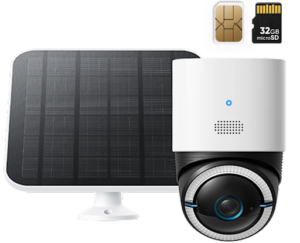
For sites where Wi-Fi is not ready, the eufy 4G LTE Cam S330 fits remote builds, storage lots, and projects waiting on internet service. It supports 4G LTE and Wi-Fi, giving the camera a connection path when wired internet is not available, but SIM setup, app settings, and cellular data cost should be confirmed before mounting it on a pole. The 9,400 mAh battery with solar charging is useful for gates or material areas that crews cannot recharge every few days. 4K color viewing, a 100-lumen spotlight, and 360° pan and tilt help when a manager needs a clearer look at a vehicle, person, or storage pile after dark. AI tracking for people and vehicles is most useful around driveways and access roads where one fixed angle may miss the full movement path.
The best option depends on the jobsite, not the biggest feature list:
- Short remodel with Wi-Fi nearby: a wire-free outdoor camera may be enough.
- Long residential buildings with open sun: solar support reduces charging trips.
- Remote lot or storage yard: a cellular model can be more realistic than waiting for internet.
- High-value tools or materials: local storage and alert history matter as much as live view.
Conclusion
Effective jobsite security cameras start with a practical setup, not permanent infrastructure. Power, connectivity, storage, and placement decide whether the system works after the crew leaves. Mount cameras where losses are most likely, protect the cameras themselves, tune alerts for nights and weekends, and keep the kit ready for the next project. The plan only needs to fit the real jobsite, even when the ground is muddy, the fence is temporary, and Wi-Fi is still missing.
