


Short videos are everywhere these days. Apps like TikTok, Instagram Reels, and YouTube Shorts are full of content that grabs your attention in just a few seconds. It can be tough to make your videos stand out with so many people posting every day.
While visuals are important, the sound is just as powerful. Using a unique voice with funny effects and creative narration can make your videos more fun and interesting right away. Many creators use voice effects to add humor, create characters, or give their videos a special vibe.
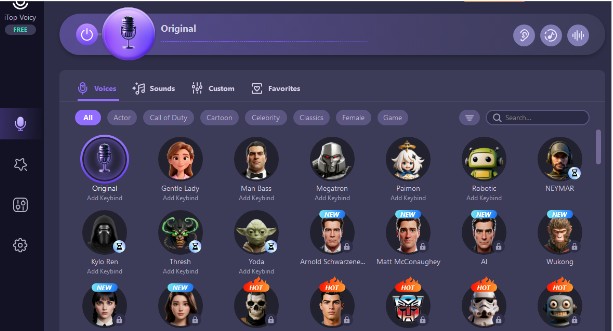
Tools like iTop Voicy let you change your voice quickly and easily instead of spending a lot of time editing audio. This software helps you try out different voice styles.
Here we will show you how iTop Voicy works and what features it has to make your social media videos more exciting and engaging.
iTop Voicy: A Simple Way to Add Fun Voice Effects to Your Social Media Videos
iTop Voicy is a voice-changing app made for Windows computers. It uses smart AI technology to change how your voice sounds. This is true whether you are talking live or working with recorded audio.
This app lets you add voice effects right away or with just a few clicks. You do not have to record your voice and then spending a lot of time editing it. You can use iTop Voicy for
- Making videos for social media
- Recording voice-overs
- Live streaming
- Talking with friends during games
- Editing audio clips
The app is easy to use. So, you can get started quickly without any hassle even if you are new to this. In short, iTop Voicy helps you change your voice easily and make your audio more fun and interesting.
Key Features of iTop Voicy for Video Creators
Here is a closer look at the features that make iTop Voicy great for social media video creators. iTop Voicy gives you easy tools to make your videos sound more fun, creative, and professional.
Real-Time Voice Effects While Recording
One cool feature is that you can change your voice as you speak into the microphone. You hear the changed voice right away. So, you can record with your chosen effect without needing to edit later.
You can adjust things like
- Pitch (how high or low your voice sounds)
- Tone (the overall sound)
- Voice style (funny, serious, robotic, etc.)
- Character feel (make your voice match different personalities)
This lets you try out different voices while you are recording your videos.
Many Voice Styles to Choose From
The app has lots of voice options, from playful and silly to deep and dramatic. For example, you can pick voices that sound like cartoons, robotic, like a deep narrator, and light and energetic.
Switching between these voices is easy, so you can test what works best for each video.
Easy Voice Editing for Existing Clips
If you already have videos or audio recorded, you can still change the voice in them. Just import your files, pick a new voice style, and apply it. This is great if you want to
- Add narration
- Replace the original voice
- Try out different voice effects
It is simple to do and does not need advanced editing skills.
Record Your Voice Inside the Program
You can record voice clips right inside iTop Voicy. This makes creating voice-overs quick and easy without needing multiple apps. The built-in recorder also reduces background noise, so your voice sounds clear. This is true even if you are recording at home.
Create Your Own Custom Voices
If you want something different from the preset voices, you can make your own.
Adjust pitch, tone, and other settings to design a voice that fits your style. Save your custom voices and use them anytime in future videos.
Works Well With Other Editing Tools
You can use iTop Voicy together with your favorite video editing software. For example
- Record or change your voice in iTop Voicy
- Export the audio file
- Add it to your video editor
This makes adding voice effects part of your regular video-making process.
How to Use iTop Voicy for Social Media Videos?
iTop Voicy makes it easy to add cool voice effects to your social media videos. It will be helping you to stand out and have fun. Here is an easy step-by-step guide to help you get started with iTop Voicy.
-
Download and Install
Go to the official iTop Voicy website and download the program. Open the installer file you downloaded. Follow the instructions and complete the setup process. Launch the program when it is ready.
-
Set Up Your Microphone
Open the software and go to the audio settings. Select your microphone from the list. Speak into your mic to test it. You should see the sound meter move when you talk.
-
Pick a Voice Effect
Browse through the voice styles available. Listen to previews and choose the one that fits your video best. Once you pick a voice, the effect will start working right away.
Record or Edit Your Audio
You have two choices here. You can record a new voice-over with your chosen voice effect. Or you can import an existing audio or video file and change the voice in it.
Pick the option that works best for your project.
Export and Add to Your Video
Save your finished audio file. Import it into your video editing software. Sync the audio with your video clips.
Now your video will have the fun voice effect included.
Reasons to Use Voice Effects for Social Media Content
Social media moves really fast, and you only have a few seconds to grab the attention of someone. Voice effects can help you do that,
- Catch Attention Quickly: A unique or surprising voice can make people stop scrolling and watch your video.
- Add Fun and Laughter: Funny voices and sound effects make your videos more entertaining and more likely to be shared.
- Create Characters: If your videos tell stories or have acting, using different voices helps bring characters to life.
- Keep Your Content Fresh: Changing your voice in different videos stops your content from feeling boring or repetitive.
Final Words
Creating great social media content is not just about the visuals. Sound also matters a lot. Adding a simple voice effect can make your videos more fun, memorable, and something people want to share.
iTop Voicy helps creators try out different voice styles, record audio easily, and change existing clips without any complicated steps.
